
Bajo Pedido
Bajo Pedido
Gingerbread House Kit Card
Por Robventions
Gingerbread House Kit Card
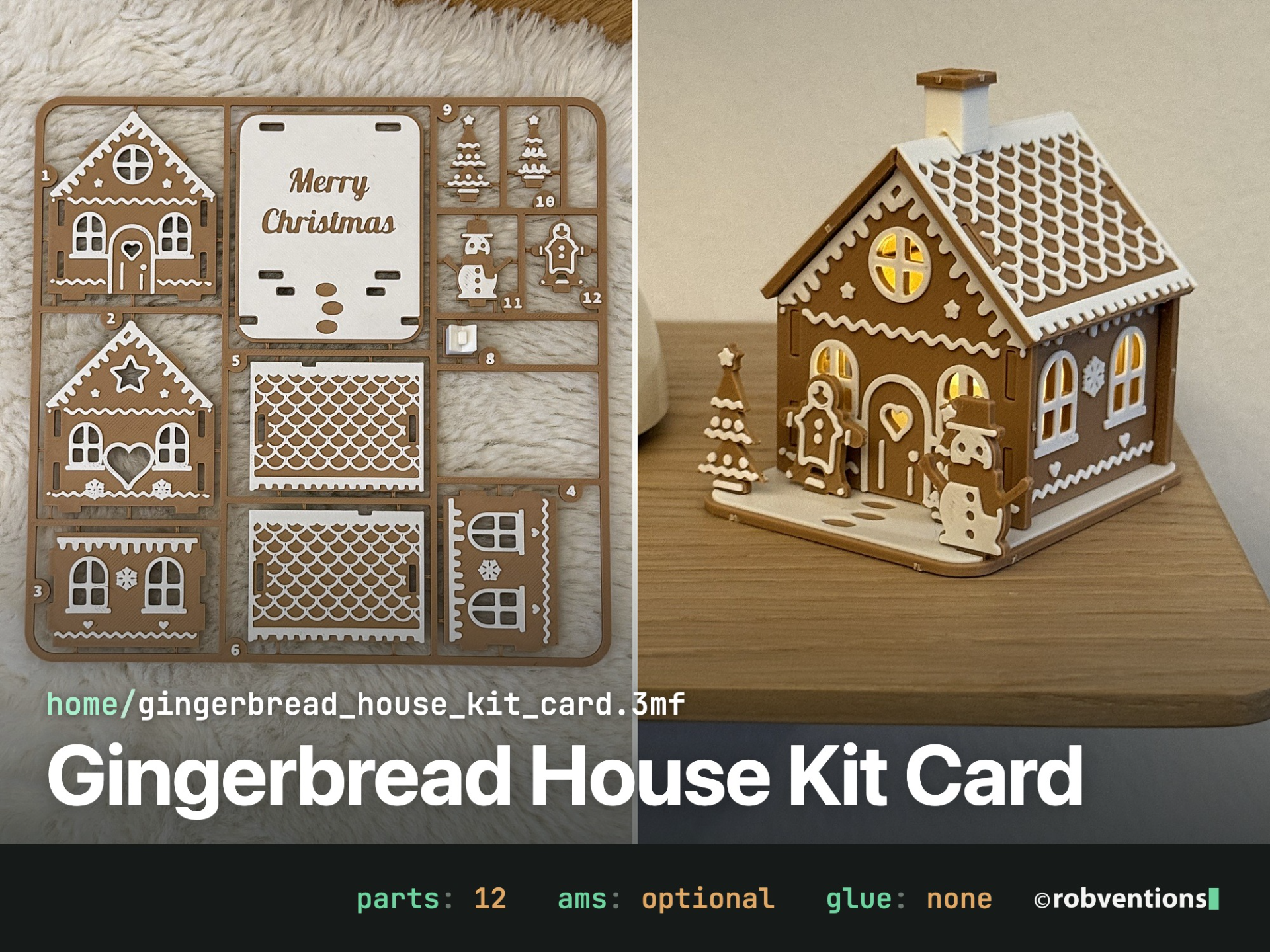
A light-up gingerbread house that prints as one kit card, just like a plastic model kit: snip the 12 numbered parts off the sprue, plug them together without glue and put an LED tealight inside. The windows, the heart and the round gable window glow warm.
Two colours, no AMS needed. Every part is a coloured plate with the white icing on top, so the whole card needs one single filament change at 2.0 mm. The no-AMS profiles pause there for you.
The Gingerbread Village
The house is part of a small series. All three use the same technique and look great side by side:
Gingerbread House Kit Card: this one, with gingerbread man, snowman and chimney
Gingerbread Chapel Kit Card: with onion dome turret
Gingerbread Market Stall Kit Card: with a waving seller, a heart garland and 5 sign texts
Highlights
One print, one kit card: 175 × 172 mm, fits every Bambu Lab printer including the A1 mini.
No AMS needed: one pause at 2.0 mm to swap to white. With AMS it is one single filament change.
No glue: the side walls lock into the gables with tenons, the roof sits on tabs, the house plugs into the base with pegs.
It lights up: lift the house off the base and put an LED tealight (up to 38 mm) inside.
Lots of icing: fish-scale roof, drips under the eaves, a door with a heart and a chimney that plugs into the ridge.
A little front yard: gingerbread man, snowman and two trees stand in slots on the snowy base.
A small surprise: "Merry Christmas" is written on the base under the house.
No supports, all parts already oriented.
Size
Assembled with base and figures: about 63 × 72 × 72 mm
House 52 × 48 mm, inside 42 × 44 mm (room for an LED tealight up to 38 mm)
Kit card: 175 × 172 mm, 13 mm tall
print profile
P1S / X1 / P1P / A1, no AMS: pause at 2.0 mm, about 1.8 h, 49 g
P1S with AMS: about 1.8 h, 42 g + 7 g white
A1 mini, no AMS: pause at 2.0 mm, about 1.9 h, 49 g
A1 mini with AMS lite: about 1.9 h, 43 g + 7 g white
0.2 mm layers, first layer 0.2 mm too (the colour change depends on it), textured PEI build plate, no supports
Colours as shown: Bambu PLA Matte Caramel + Ivory White. Any two colours work, red + white looks great too.
No AMS?
Load the brown filament and start the print. At 2.0 mm the printer pauses: unload, load white, resume. That's it.
With AMS
There is only one filament change, so the prime tower is flat (2 mm tall) and already placed in the empty field of the card. If your own process preset brings back the big default tower, set its width to 26 mm and turn off "rib wall", or switch the tower off. One change works without it.
What you need
Flush cutter
LED tealight, max. 38 mm. LED only, never a real candle: PLA softens at about 60 °C.
Assembly
Snip the parts off the card and trim the gate nubs flush. Tenons, tabs, pegs and the tree stars have no gates on purpose.
Push both side walls (3, 4) with their tenons into the slots of the front gable (1), then press the back gable (2) onto the other tenons.
Set the house onto the base (7): the pegs under the gables go into the slots.
Put on the roof halves (5, 6): the tabs on the gables go into the slots in the roof. The notches at the ridge sit above each other, that's where the chimney goes.
Plug the chimney (8) into the ridge. Put the trees (9, 10), the snowman (11) and the gingerbread man (12) into the slots at the front.
For the tealight, simply lift the house off the base.
Tip: if a joint is too tight, sand the tenon a little. If you want it to stay put for good, a drop of super glue does the job.
Happy Printmas to all makers!
Deutsch
A lit gingerbread house as a kit card, just like a model kit: cut out the 12 numbered parts with side cutters, plug them together without glue and insert an LED tealight. Windows, heart and round window glow warmly.
Gingerbread village: The house is part of a small series including the chapel and the market stall (links above)
One print, one card: 175 × 172 mm, fits every Bambu Lab printer, including the A1 mini
No AMS required:…
Este modelo es de su autor en MakerWorld. Nexta3D presupuesta la impresión según la pieza, el material y el tamaño.